Customer testimonials are one of the most effective ways to build trust with potential buyers. When people see real customers sharing their experiences, they get a better understanding of a product or service before making a decision.
However, collecting video testimonials manually can be difficult. Businesses often need to contact customers individually, schedule recordings, arrange equipment, and spend time editing videos.
Fortunately, there’s a simpler solution.
With video testimonial software, businesses can automatically request customer videos using simple recording links, automated messages, and CRM triggers.
In this guide, we’ll explain how to collect video testimonials automatically, how to build an automated collection workflow, and which tools can help you get started without hiring professional videographers.
What Are Automated Video Testimonials?
Automated video testimonials are customer feedback videos collected through an automated process.
Instead of arranging individual recording sessions, businesses send customers a link where they can record and submit their testimonials using their smartphones or computers.
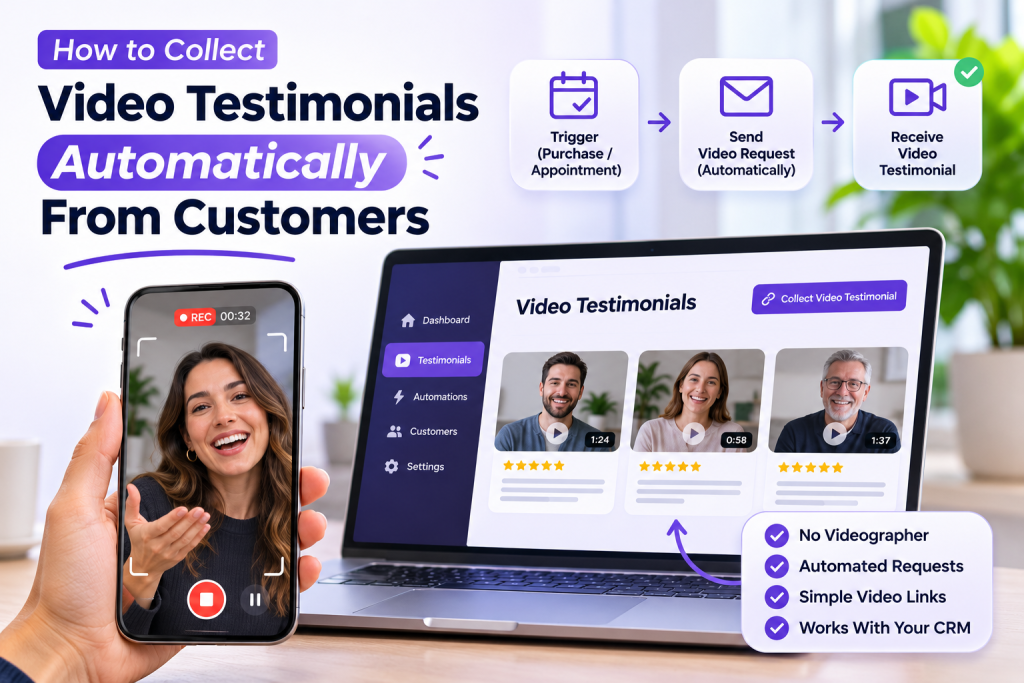
The process typically works like this:
- A customer purchases a product or completes a service.
- Your CRM identifies the completed transaction.
- An automated testimonial request is sent through email or SMS.
- The customer opens a recording link.
- They record and submit their video testimonial.
- Your business receives the video for review and approval.
This approach makes collecting customer stories easier, faster, and more scalable.
Why Should Businesses Collect Video Testimonials?
Video testimonials offer several advantages over traditional written reviews.
1. Build Trust With Real Customer Experiences
Potential customers want to know whether a business delivers what it promises.
Video testimonials allow existing customers to explain their experiences in their own words, helping prospective buyers understand the value of your products or services.
2. Make Customer Feedback More Personal
Written reviews are useful, but videos add facial expressions, voice, and personality.
These elements can make customer stories more engaging and relatable.
3. Save Time and Money
Hiring videographers, arranging recording sessions, and editing customer interviews can become expensive.
Automated video testimonial tools allow customers to record videos independently using devices they already own.
4. Collect Testimonials Consistently
Instead of remembering to contact customers manually, businesses can configure automated requests whenever specific customer activities occur.
This creates a repeatable testimonial collection process.
How to Collect Video Testimonials Automatically
You don’t need expensive equipment or complicated production workflows. Here’s how to build a simple automated system.
Step 1: Choose Video Testimonial Software
Start by choosing a platform that allows customers to record and submit videos through a simple link.
Look for features such as:
- Direct video recording links.
- Mobile-friendly recording experiences.
- Automated email invitations.
- Customer submission management.
- Video storage and organization.
- CRM integrations or automation support.
The goal is to make recording as simple as possible for your customers.
Step 2: Create a Simple Video Testimonial Request
Create a short invitation explaining why you want customer feedback.
Your message should include a direct link where customers can record their videos.
Example email:
Subject: We’d Love to Hear Your Story!
Hi [Customer Name],
Thank you for choosing [Business Name].
We’d love to hear about your experience working with us.
Would you mind recording a short video sharing your thoughts? It only takes a few minutes, and your feedback could help other customers make informed decisions.
Click below to record your testimonial:
[Record Your Video Testimonial]
Thank you for your support!
Best regards,
[Business Name] Team
Step 3: Set Up Automated Requests
Now connect your testimonial collection process to your CRM, booking system, or eCommerce platform.
Create triggers based on important customer activities.
For example:
- A purchase is completed.
- A project is marked as finished.
- An appointment is completed.
- A customer reaches a specific milestone.
When the trigger occurs, your system automatically sends the testimonial request.
This removes the need for manual follow-ups.
Step 4: Give Customers Simple Recording Instructions
Customers should not need professional recording equipment.
Encourage them to:
- Use their smartphone or computer.
- Record in a quiet environment.
- Face a natural light source.
- Keep their video short and conversational.
- Speak naturally about their experience.
You can also provide a few simple questions to help customers get started.
Step 5: Review and Organize Submitted Videos
Once customers submit their videos, organize them by customer, product, service, or campaign.
Review each submission before publishing it.
Always obtain appropriate permission to use customer videos in your website, advertisements, social media, or other marketing materials.
How to Automate Video Testimonial Requests for Different Businesses
Different businesses can use automated video testimonial workflows based on their customer journey.
eCommerce Stores
Online stores can request video testimonials after customers receive and use their products.
Example workflow:
- Customer purchases a product.
- Order is delivered.
- CRM triggers an automated email.
- Customer receives a video recording link.
- Submitted testimonial is added to the business’s collection.
This helps eCommerce brands collect authentic customer experiences without arranging individual recording sessions.
Med Spas and Aesthetic Clinics
Clinics can request testimonials after customers complete an appropriate treatment or service.
For example, after a customer has had sufficient time to experience the results, the clinic can send a personalized testimonial request.
Healthcare-related businesses should ensure that testimonial collection and publication follow applicable patient privacy requirements and obtain appropriate written consent.
Marketing Agencies
Agencies can request video testimonials after completing a successful client project or achieving an agreed milestone.
These videos can help demonstrate the agency’s experience and explain the value of its services.
Coaches and Consultants
Coaches can automatically request video testimonials after clients complete a program, training session, or consulting engagement.
A simple recording link makes it easier for clients to share their experiences without scheduling a separate interview.
Home Service Businesses
Contractors, cleaning companies, and home improvement businesses can send testimonial requests after completing projects.
Customers can record short videos explaining their experience and satisfaction with the service.
Best Practices for Collecting More Video Testimonials
A successful video testimonial strategy should make the process comfortable and convenient for customers.
Here are some useful tips.
Keep requests short: Explain what you need and why you’re requesting a testimonial.
Send requests at the right time: Contact customers after they have had enough time to experience your product or service.
Make recording easy: Avoid unnecessary account creation or complicated recording instructions.
Ask helpful questions: Give customers simple prompts rather than asking them to prepare a full script.
Send polite reminders: If a customer hasn’t submitted a video, one friendly reminder may help.
Respect customer privacy: Obtain permission before using submitted videos publicly.
Avoid scripted or misleading testimonials: Encourage customers to share their genuine experiences in their own words.
How Getform.ai Helps Collect Customer Feedback
Getform.ai is an AI-powered form builder that helps businesses create forms and collect customer responses.
Businesses can use its form-building capabilities to create customer feedback and testimonial submission experiences.
Some useful capabilities include:
- AI-powered form creation.
- Customizable forms.
- Conditional logic.
- Customer feedback collection.
- Form submission management.
- Integrations and workflow automation.
For video testimonial collection, businesses can explore using a form-based submission workflow to collect customer information and video links or supported uploads, depending on the platform’s current file and integration capabilities.
You can explore the platform at Getform.ai.
Frequently Asked Questions
1. What is the best video testimonial software?
The best video testimonial software depends on your requirements. Look for tools that support simple recording links, mobile-friendly submissions, video management, and automated requests.
2. How can I collect video testimonials automatically?
You can connect a video testimonial collection platform to your CRM or booking system. When a customer completes a purchase, appointment, or service, an automated message sends them a recording link.
3. Do customers need professional cameras to record testimonials?
No. Most customers can record useful testimonials using their smartphones or computers. Good lighting, clear audio, and a quiet environment are usually enough.
4. Can I request video testimonials through email?
Yes. You can send automated emails containing a direct recording link. Customers can open the link and follow the recording instructions.
5. When should I request a video testimonial?
The ideal time depends on the business. eCommerce stores can wait until customers receive and experience their products, while service providers can send requests after project completion.
6. Are automated video testimonials authentic?
They can be completely authentic when customers independently share their genuine experiences. Automation should simplify the request and submission process, not control what customers say.
Final Thoughts
Collecting video testimonials doesn’t have to involve expensive equipment, professional videographers, or manually scheduled interviews.
With the right video testimonial software and automated workflows, businesses can request customer videos through simple links and CRM triggers.
Whether you operate an eCommerce store, agency, clinic, or service business, automated video testimonials can help you collect authentic customer stories and build stronger trust with potential customers.
Start by creating a simple request, connecting it to your customer workflow, and making it easy for people to record their experiences.